

About 2 minutes · no code
How to Connect Your Framer Forms to HubSpot (Step-by-Step)
You already have a form on your Framer site. By the end of this page, every person who fills it in will show up as a HubSpot contact — with your design, your fields and your success state untouched.
What you need first
A published or draft Framer site with a form on it, and a destination form created in your HubSpot account.
Design your Framer form as you normally would
Open the page your form should live on. Two placement rules matter, and they are the thing people most often get wrong:
Your form sits outside the page frame, beside it on the canvas.
The connector you add in step 2 sits inside the page frame.
The connector is what renders on the published site; it pulls in the form you point it at. If you drag your form onto the canvas beside the page and leave it there, you’re set.
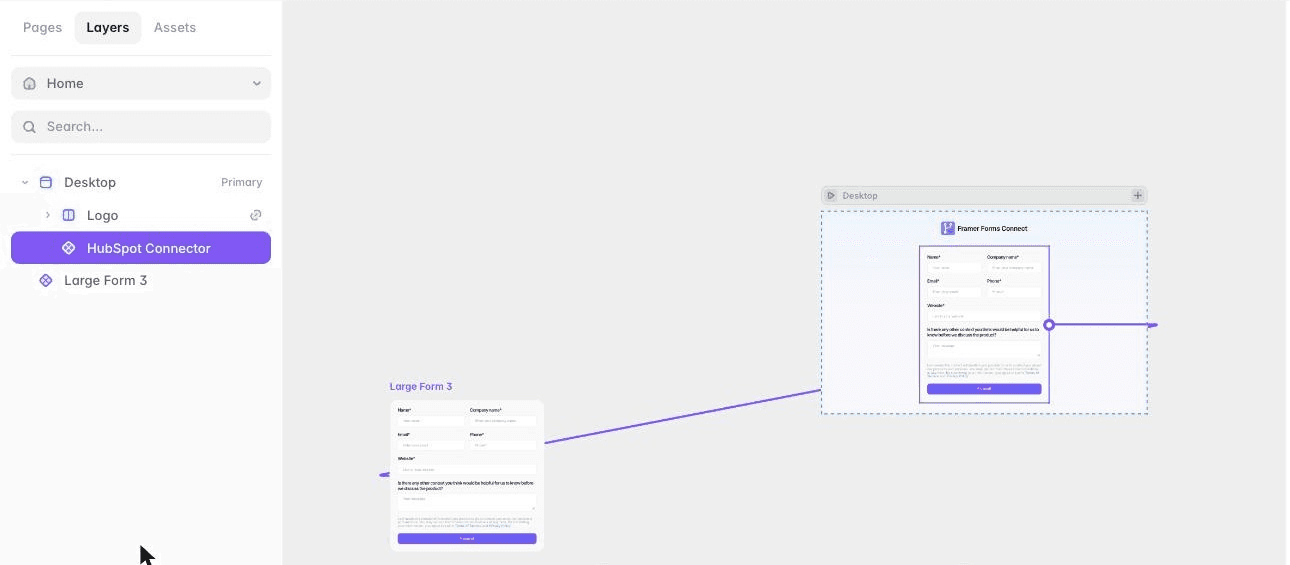
Left: your form, loose on the canvas. Right: the connector, nested inside the page frame — see the Layers panel. The purple line is the link between them.
Connect HubSpot to your Framer form from the plugin
Open the plugin. Framer menu → Plugins → Browse All, search for Framer Forms Connect.
Once it’s installed, Plugins → Run Recent Plugin is quicker.
Add HubSpot. Drag it onto your page, or click the +. A HubSpot Connector component lands on the canvas.


Wire the connector to your form. Drag from the purple dot on the edge of the connector onto your form. A purple line joins them, and the connector’s settings in the right-hand panel now read Form: <your form>. If that field still says Select…, the link didn’t take — drag again.
Sign in. Click Sign in to HubSpot in the plugin and approve the connection.
No HubSpot Login?: Use Don’t have the login details? Configure manually and paste the form’s embed code instead — ask your client to send it from HubSpot. Everything else works the same, except the plugin can’t suggest field names for you.
Match the field names. Pick your HubSpot form and the plugin lists every field it expects, with a Click to copy chip beside each one. Copy each chip, select the matching input inside your Framer form, and paste it into the input’s Name property.
✔ Names are case-sensitive and exact. Email is not email.
✔ Some names look wrong but aren’t — 0-2/name is a real HubSpot internal name.
✔ The Name property is separate from the label and the placeholder. Those stay however you designed them.
✔ Every field HubSpot marks Required needs a counterpart in your Framer form. Optional ones you can skip, and extra Framer fields with no HubSpot match are ignored.
Test the HubSpot connection with a real submission
Hit Publish, open the live URL and send a real submission. Testing on the published site is the only way to see what HubSpot actually says back.

Fill it in as a visitor would.
A green line under the form means it went through:

Fill it in as a visitor would.
If something is off, you get the reason rather than a silent failure. A missing required field reads like this:
⚠ REQUIRED_FIELD: Error in 'fields.consent'. Required field 'consent' is missing
Publish and hide the debug banner
One last thing before you call it done. Select the HubSpot Connector on the canvas and set Show Errors to No. That banner is a build-time diagnostic — useful to you, confusing to visitors. The plugin reminds you of this in the success message itself:
✅ Sent successfully! Disable "Show errors" in the component settings to remove this message
Before you decide
Why not Zapier, Make or a webhook?
You can wire a Framer form to HubSpot with Framer’s webhook and an automation tool. Forms Connect exists because that route adds three things you then have to babysit:
A second subscription. Zapier and Make bill per task. Every submission is a task, and the free tiers run out fast.
A silent point of failure. If the automation errors, the visitor still sees a success message and the lead is gone. The plugin shows you the reason on the page while you test.
Field mapping in two places. A webhook sends raw field names, so you map them again in the automation. The plugin reads HubSpot’s field list and you map once, inside Framer.
If you already pay for Zapier and need one submission routed to five tools, use it. If you want one HubSpot form connected in about two minutes with nothing else to maintain, that is what the plugin does.
Framer forms to HubSpot: FAQ and troubleshooting
HubSpot receives my submissions, but marks them as spam.
You need to whitelist your domain in HubSpot and Framer subdomains, namely:
framer.website
framer.app
Form works well on desktop, but collapses on mobile.
Set the wrapper's position as Fill in Framer instead of Fit.
How do I use a separate version of the form on mobile?
You'll need to create a separate form and hide the desktop version on mobile.
Still stuck
Email us at annyeong@romans.design with the site URL and we’ll look at it with you. A real person reads it - no automated responses.
Before you write, two pages solve most cases: the ten checks for submissions that do not show up and where Framer form submissions go.
That’s the whole setup.
Every other integration follows the same five steps. Try it on your own site free for seven days.
Send Framer forms to other tools
Mailchimp · Brevo · Beehiiv · MailerLite · Drip · Jotform · Slack · Discord · All tutorials